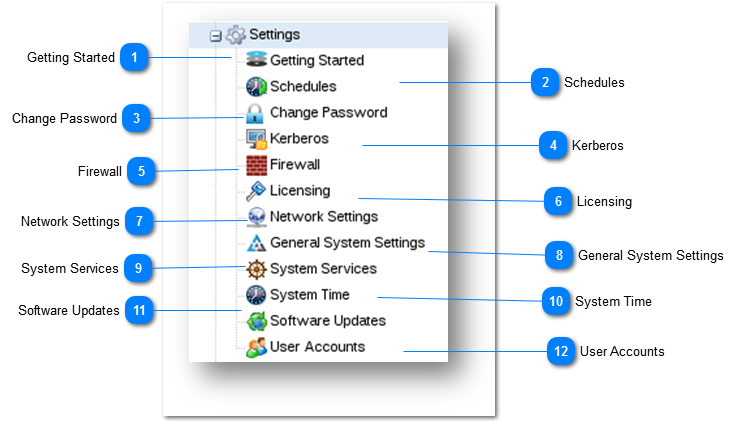
The Settings section allows you to configure core modules such as Schedules, Change Password, Kerberos, Firewall, Licensing, Network Settings, General System Settings, System Services, System Time, Software Updates and User Accounts.
 Getting Started
When SoftNAS StorageCenter is first started, the Getting Started helper will be displayed. This helper provides a set of step-by-step, on-screen instructions designed to make initial configuration, setup and use of SoftNAS faster and easier for first-time users.
For more information, refer to the following link.
|
 Schedules
SoftNAS includes a task scheduler, used to execute various tasks on a periodic basis; e.g., scheduled snapshots, scheduled replication, etc.
For more information, refer to the following link.
|
 Change Password
You can configure and manage all users's passwords from Passwords panel.
For more information, refer to the following link.
|
 Kerberos
The Kerberos helps in communicating over a non-secure network to prove identity to one another in a secure manner. You can configure Kerberos from SoftNAS.
For more information, refer to the following link.
|
 Firewall
The Firewall in SoftNAS helps you to control the incoming and outgoing network traffic in VPN.
For more information, refer to the following link.
|
 Licensing
You can enter license key and activate your copy of SoftNAS.
For more information, refer to the following link.
|
 Network Settings
You can administer network interfaces, routing and gateways, hostname, DNS and other network-related configuration.
For more information, refer to the following link.
|
 General System Settings
The System Settings in SoftNAS allows configuring general system settings through the standard Webmin control panel. SoftNAS uses Webmin to provide robust Linux administration functionality. It provides a rich, extensive set of Linux administration tools for advanced users.
.For more information, refer to the following link.
|
 System Services
The System Services allows you to manage all bootup and shutdown processes and services. You can also create a new upstart service.
For more information, refer to the following link.
|
 System Time
The System Time module allows you to configure system time and hardware clock. You can also change time zone and synchronize the system time with a remote server.
For more information, refer to the following link.
|
 Software Updates
After installing SoftNAS, it is recommended to perform a software update to ensure that you are running the latest version.
For more information, refer to the following link.
|
 User Accounts
The User Accounts section of SoftNAS allows you to add, edit, remove and manage user groups and users.
For more information, refer to the following link.
|
|