Volume Snapshot Control Panel
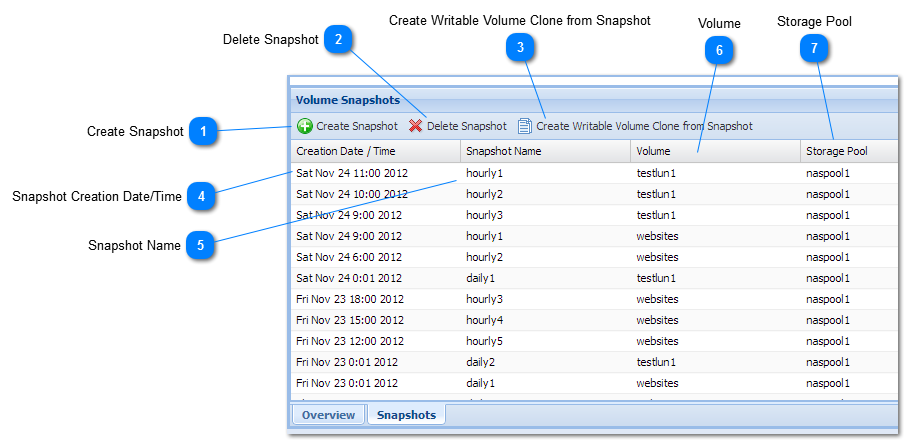
The Snapshots tab contains the Volume Snapshot Control Panel. The grid shows a list of snapshots for the currently selected volume (in the upper grid on the page). In no single volume is selected, then snapshots for all volumes are shown (default until a volume is selected).
 Create Snapshot
Creates an ad-hoc snapshot of the currently selected volume (from the top grid).
|
 Delete Snapshot
Select a snapshot and then press Delete Snapshot to remove the snapshot. Removing a snapshot removes the recovery point, along with any older disk blocks that were associated with the snapshot (it does not affect any current data blocks).
|
 Create Writable Volume Clone from Snapshot
Creates a new volume as a writable "clone" of the snapshot. The writable clone volume is an exact replica of the volume at the time the snapshot was originally taken. The cloned volume doesn't take up any appreciable additional space; however, as changes are made to the cloned volume, new data blocks are created as "difference blocks".
Note that it's best practice to recover any data you may need from the cloned volume, then delete the clone and its snapshot as soon as possible; otherwise, the snapshot and clone will continue to keep the older disk blocks "locked up" (allocated), occupying additional disk space over time.
|
 Snapshot Creation Date/Time
Date and time the snapshot was created. This is the point in time at which an index to the volume's state was marked.
|
 Snapshot Name
Each snapshot is given a name which uniquely identifies it for that volume. Scheduled snapshots have names corresponding to the frequency at which snapshots are taken; i.e,, hourlyNN, dailyNN, weeklyNN. When an ad-hoc snapshot is created, it is receives a name in the form "snapMMMDDYYYY-HHMMSS; e.g., snapNov242012-135901 would have been taken on November 24, 2012 at 1:59:01 p.m.
|
 Volume
The snapshot's volume name.
|
 Storage Pool
The snapshot's storage pool.
|
|