SoftNAS includes a task scheduler, used to execute various tasks on a periodic basis; e.g., scheduled snapshots, scheduled replication, etc.
A "schedule" is a definition of when and how often tasks should run. A task, such as a scheduled volume snapshot, is assigned a schedule on which the task will run. For example, a volume can be assigned to have snapshots taken on the "Business" schedule (e.g., Mon-Fri at certain hours during the business day, but not on weekends).
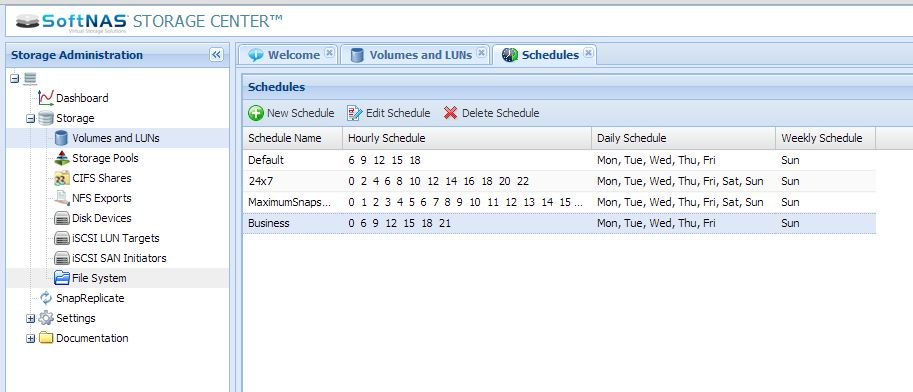
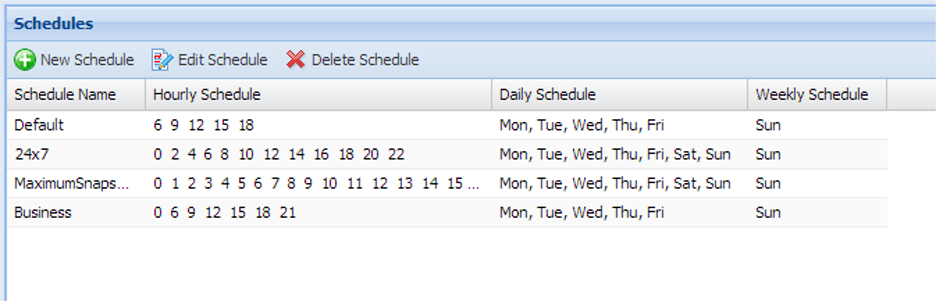
Here's how the available schedules appear in the "Schedules" tab:
Note the "Hourly Schedule" column shows which hours of the day the schedule is configured to execute. The "Daily Schedule" shows the days of the week the daily schedule runs, and the "Weekly Schedule" shows the day of the week for the weekly tasks.
Scheduled tasks can be configured to take place on an hourly, daily and/or weekly basis.
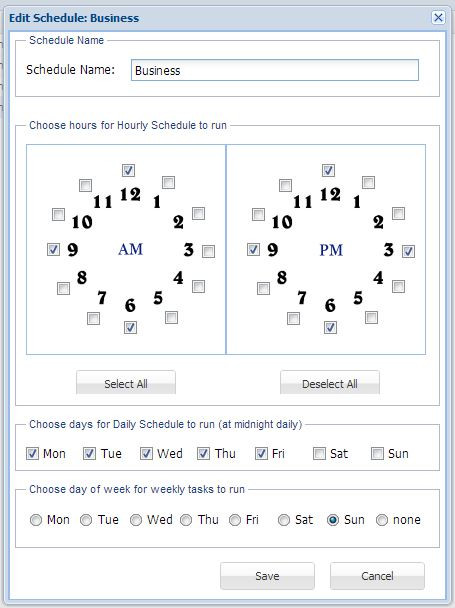
The following dialog is used to define how the schedule will operate:
Schedules can be assigned most any descriptive name. Names must begin with an alphabetical character and contain any combination of upper and lower case alphanumerics.
As shown above, to choose a particular hour of the day for the schedule to activate its assigned task(s), simply select checkboxes representing the hours of the day (A.M. and P.M.) during which the task should run.
Daily tasks run at 1:00 a.m. on the days of the week chosen.
Weekly tasks run at 2:00 a.m. on the day of the week chosen.
Schedules are reusable by all system objects (e.g., volumes) that reference the schedule; i.e., when you change the definition of a schedule, the changes immediately apply to all objects with SoftNAS tasks running on that particular schedule.
The "Default" schedule may be modified, but cannot be deleted.