To properly display this page you need a browser with JavaScript support.
SoftNAS™ Reference Guide
Menu
Index
Search
Search
Search
SoftNAS™ Reference Guide
User Administration Guide
Storage Administration Interface Reference
Settings
Network Settings
← Previous page
Next page →
Print version
Copyright © 2012 SoftNAS, LLC.
SoftNAS™ Reference Guide
Notices
User Administration Guide
Storage Administration Interface Reference
License Agreement
Admin Menu
Welcome
Dashboard
Volumes
Volumes Panel Details
Create Volume Dialog
Edit Volume Dialog
Volume Snapshot Control Panel
Storage Pools
Storage Pools
Pool Details
CIFS Shares
CIFS Shares via Samba Windows File Sharing
NFS Exports
NFS Exports
Disk Devices
iSCSI LUNs and Targets
iSCSI Target and LUN Configuration
File System
SnapReplicate
Settings
Schedules
Licensing
Firewall
Network Settings
Network Interfaces
Routing and Gateways
Host name and DNS
Host addresses
General System Settings
System Services
Change Password
System Time
Software Updates
User Accounts
Network Settings
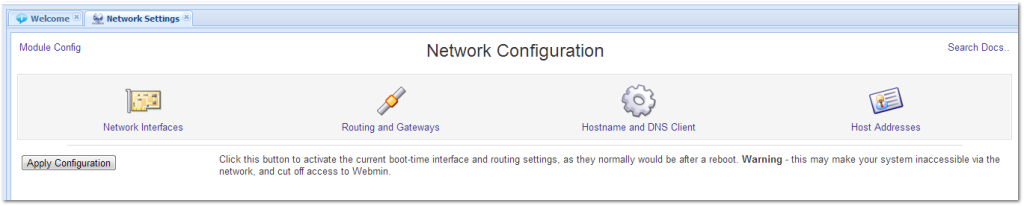
The Network Settings panel is used to administer network interfaces, routing and gateways, hostname, DNS and other network-related configuration.
Click on one of the icons or links to access each network configuration area.
Network Interfaces
Routing and Gateways
Host name and DNS
Host Addresses
The contents of Network Settings
Network Interfaces
Routing and Gateways
Host name and DNS
Host addresses